Designing a group travel funciton
In collaboration with Purdue's UX department, KAYAK wanted to expand their traveling features to enhance their website's experience, specifically, their group traveling feature.
My Role
UX Designer Intern
User Research, Wireframing,
Interaction Design, Prototyping
Team
6
Worked alongside 6 other UX designer interns
Duration
3 months
User research, low to high fidelity mockups, as well as a documented hand-off to dev
Tools
Figma
Miro board, Figjam, Slack, and Notion
Project Summary
PROCESS
Mapping the group trip from start to finish
Interviews and journey mapping showed that planning was where groups broke down. From there, we went from low- to high-fidelity designs to a documented hand-off.
OUTCOME
One shared space to plan, vote and book
Shared trips, a group calendar, voting on locations and stays, and a budget tracker keep everyone on the same page.
PROBLEM
Group trips stall before anyone books
Budget, dates and location all depend on each other, but groups sorted them out in scattered chats. Plans lost momentum before anyone booked.
01
Challenge
From Clunky Browsing to Seamless Shopping
KAYAK is a metasearch engine for travel services that strives to help its customers experience the best travel expedite by finding the best flights, hotels, rental cars, and vacation packages.
In collaboration with Purdue's UX department, KAYAK wanted to expand their traveling features to enhance their website's experience, specifically, their group travelling feature.
With a team 7 UX Design students, we were tasked to design a group travel feature for KAYAK's website.
DESIGN GOAL
Reevaluate KAYAK’s existing travel experience & redesign the booking journey, while introducing a group travel feature to simplify planning and coordination.
02
Research Insights
Overlapping needs from groups causes pain points & confusion
After a series of interviews and research into the current user base, we gathered out data and outlined our users' group traveling experience, from planning all the way to ending the trip.
We found our main focus to be within the planning stage, where Budget, Dates, Location are all happening at the same time. Those three points effect each other but all three points have to be done to continue to the next part of the journey.

KEY TAKEAWAY
How do we coordinate budget, dates, and location for users in the same step?
04
Solution
Introducing KAYAK's new group travel feature


01
Group trip feature
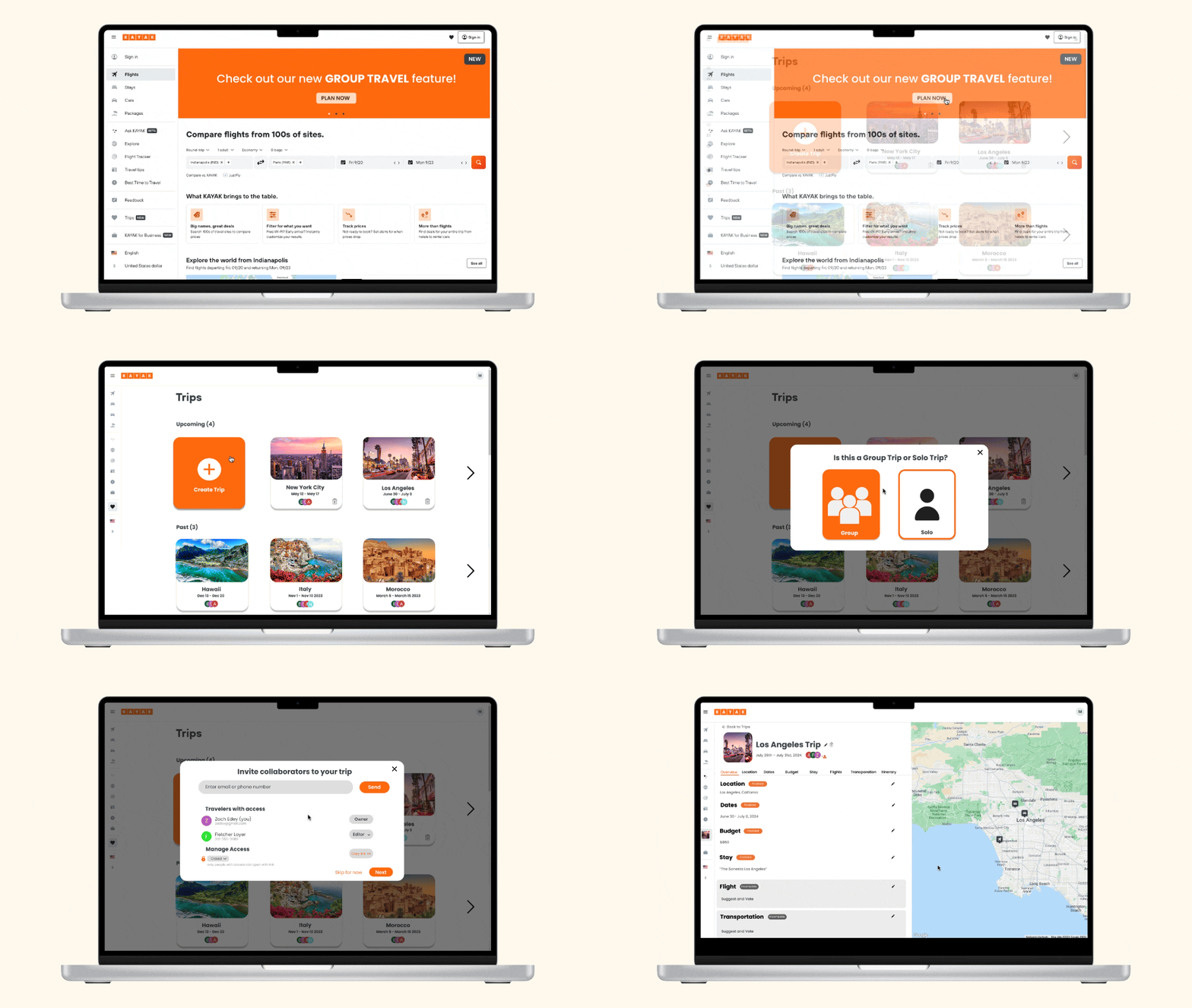
Create group trips and Invite collaborators to plan and view your trip itinerary, including locations, dates, budget, and more.

03
Collaborative calendars for plannning dates
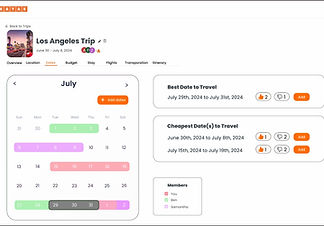
Coordinating dates is often hectic and confusing for our users. Collaborators will be able to search and add their available dates, making it easy to find shared availability.

02
Group vote for locations & stays
To ensure locations are a fair and transparent agreement among the group, users will be able to search, add, and vote for each other's suggestions for locations, stays, and activities.
%20F2_edited.jpg)
04
Budget tracker & expense calculations
Budgets were reported to be by far the biggest headaches for users. We created a budget tracker that sets/tracks a total budget, as well as each individual in the group.
View my other work


Let's build something awesome :)